New Open Source SPFx Project: Policy Acknowledgement Center for SharePoint Intranets
Billy Peralta
April 29, 2026 · 9 min read
TL;DR
I just launched a new open-source SharePoint Framework project: SPFx Policy Acknowledgement Center. It is a practical solution for publishing policies, collecting employee acknowledgements, and tracking compliance directly inside modern SharePoint intranets. It includes an employee-facing acknowledgement web part and an admin-facing compliance dashboard, built with SPFx 1.22.2, React, TypeScript, PnPjs, Fluent UI, and Microsoft Graph.
Table of Contents
- Why I Built This Project
- What the SPFx Policy Acknowledgement Center Does
- Employee-Facing Policy Acknowledgement Web Part
- Admin-Facing Compliance Dashboard
- Built on SharePoint Lists
- Version Tracking Matters
- Microsoft Graph and Department Targeting
- Technology Used
- Why This Is Useful for SharePoint Intranets
- Example Use Cases
- Why I Open-Sourced It
- Roadmap Ideas
- Final Thoughts
Introduction
Many organizations publish important employee policies in SharePoint, but they often struggle with one simple question:
How do we know employees actually reviewed and acknowledged the latest version?
Policies such as acceptable use, remote work, information security, artificial intelligence usage, code of conduct, privacy, records retention, and data handling are usually stored somewhere in SharePoint. The problem is that publishing a document is not the same as confirming that employees have read it.
That is why I created a new open-source project:
SPFx Policy Acknowledgement Center
GitHub repository: https://github.com/BillySharePoint/spfx-policy-acknowledgement-center
The goal of this project is to demonstrate how SharePoint Online can be extended into a practical policy acknowledgement and compliance tracking experience using SharePoint Framework, SharePoint lists, PnPjs, Fluent UI, and Microsoft Graph.
Why I Built This Project
In many Microsoft 365 environments, SharePoint is already the place where policies, procedures, HR documents, IT standards, and governance materials are published. However, the acknowledgement process is often handled separately through emails, spreadsheets, manual tracking, or third-party tools.
That creates several problems:
- Employees may not know which policies apply to them.
- Policy owners may not know who has acknowledged the latest version.
- Managers may not have visibility into overdue acknowledgements.
- HR, IT, security, and compliance teams may lack an easy reporting view.
- Updated policies may require re-acknowledgement, but version tracking is difficult.
- The process becomes manual, inconsistent, and hard to audit.
The SPFx Policy Acknowledgement Center is designed to show how this type of business process can live directly inside a SharePoint intranet.
What the SPFx Policy Acknowledgement Center Does
The project provides two main SharePoint Framework web parts:
- Policy Acknowledgement Web Part for employees.
- Policy Compliance Dashboard Web Part for admins, policy owners, HR, IT, or compliance teams.
Together, these web parts create a simple but practical policy acknowledgement experience inside SharePoint Online.
Employee-Facing Policy Acknowledgement Web Part
The employee-facing web part gives users a clear view of the policies assigned to them.
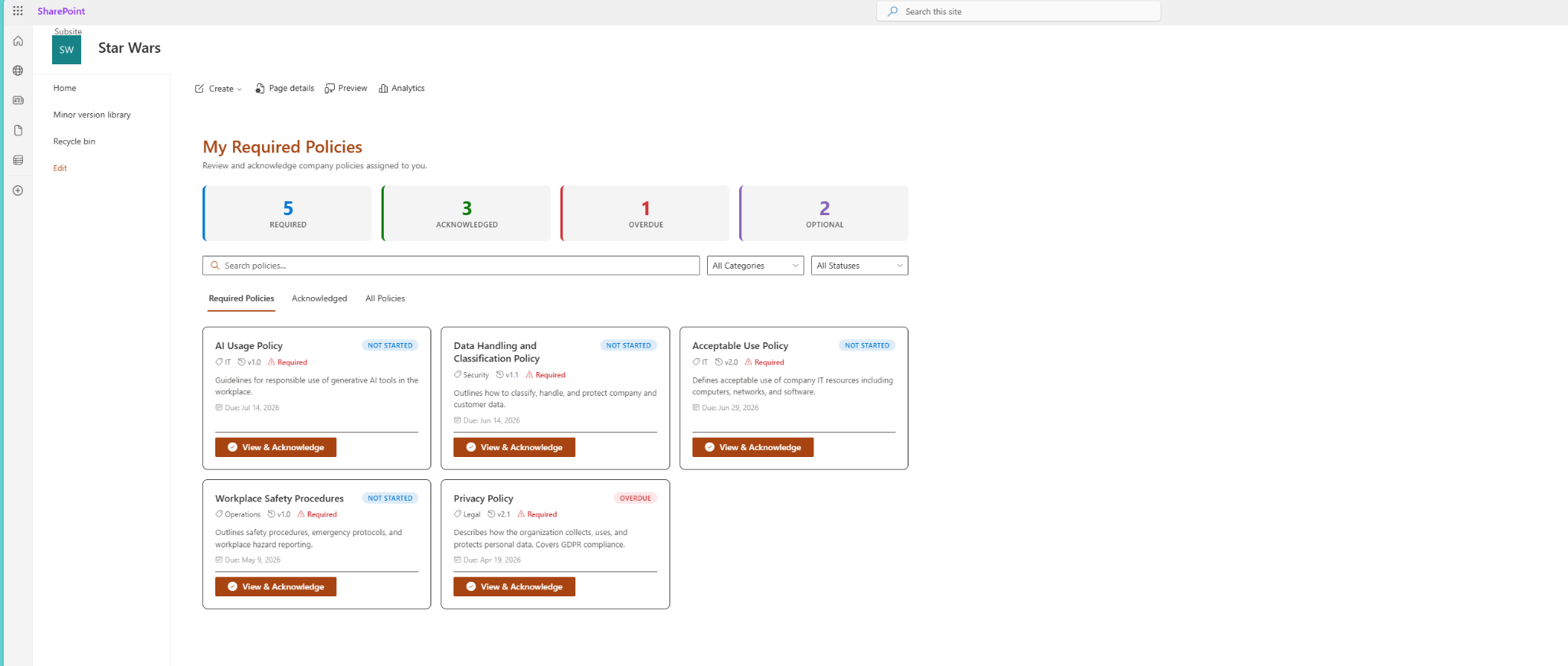
Employee-facing policy acknowledgement view showing required policies, acknowledgement status, overdue items, and optional policies.
Employees can:
- View required policies.
- See due dates.
- Open policy details.
- Review linked policy documents.
- Confirm acknowledgement.
- View acknowledgement history.
- See status badges such as Not Started, Acknowledged, Overdue, Expired, or Optional.
This creates a cleaner experience than sending employees a policy document by email and hoping the acknowledgement is tracked somewhere else.
The policy detail panel gives employees a focused place to review the policy details, confirm acknowledgement, and optionally leave comments.
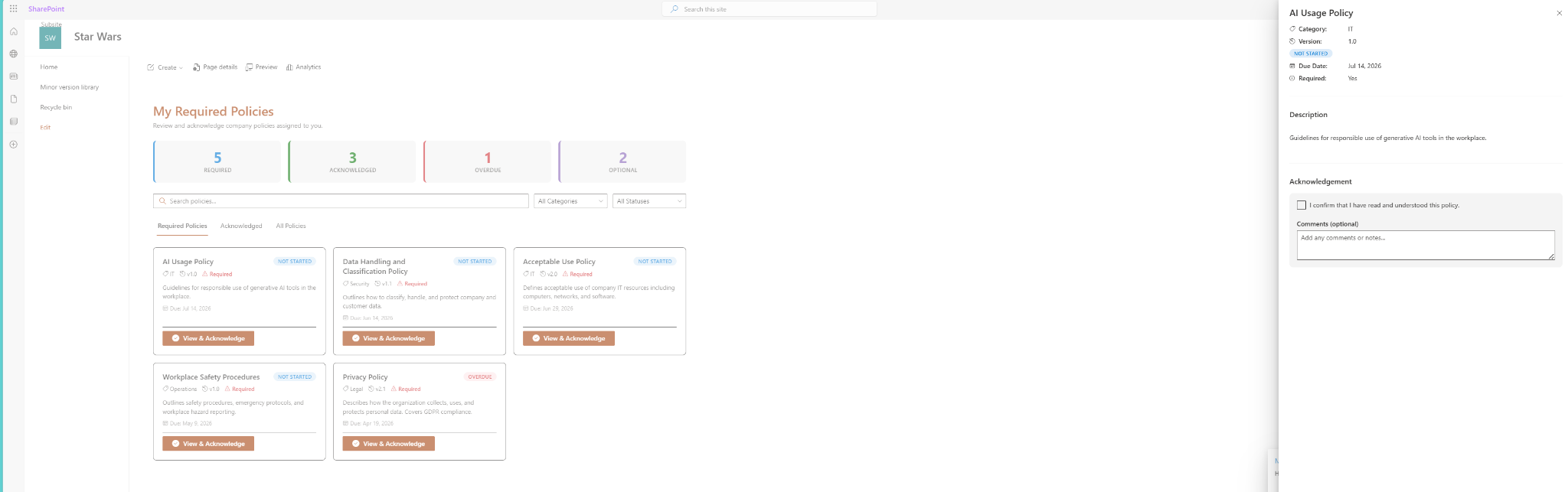
Policy detail panel with category, version, due date, description, and acknowledgement confirmation.
The goal is to make the process simple:
- Employee opens the intranet page.
- Employee sees assigned policies.
- Employee reads the policy.
- Employee confirms acknowledgement.
- SharePoint stores the acknowledgement record.
Admin-Facing Compliance Dashboard
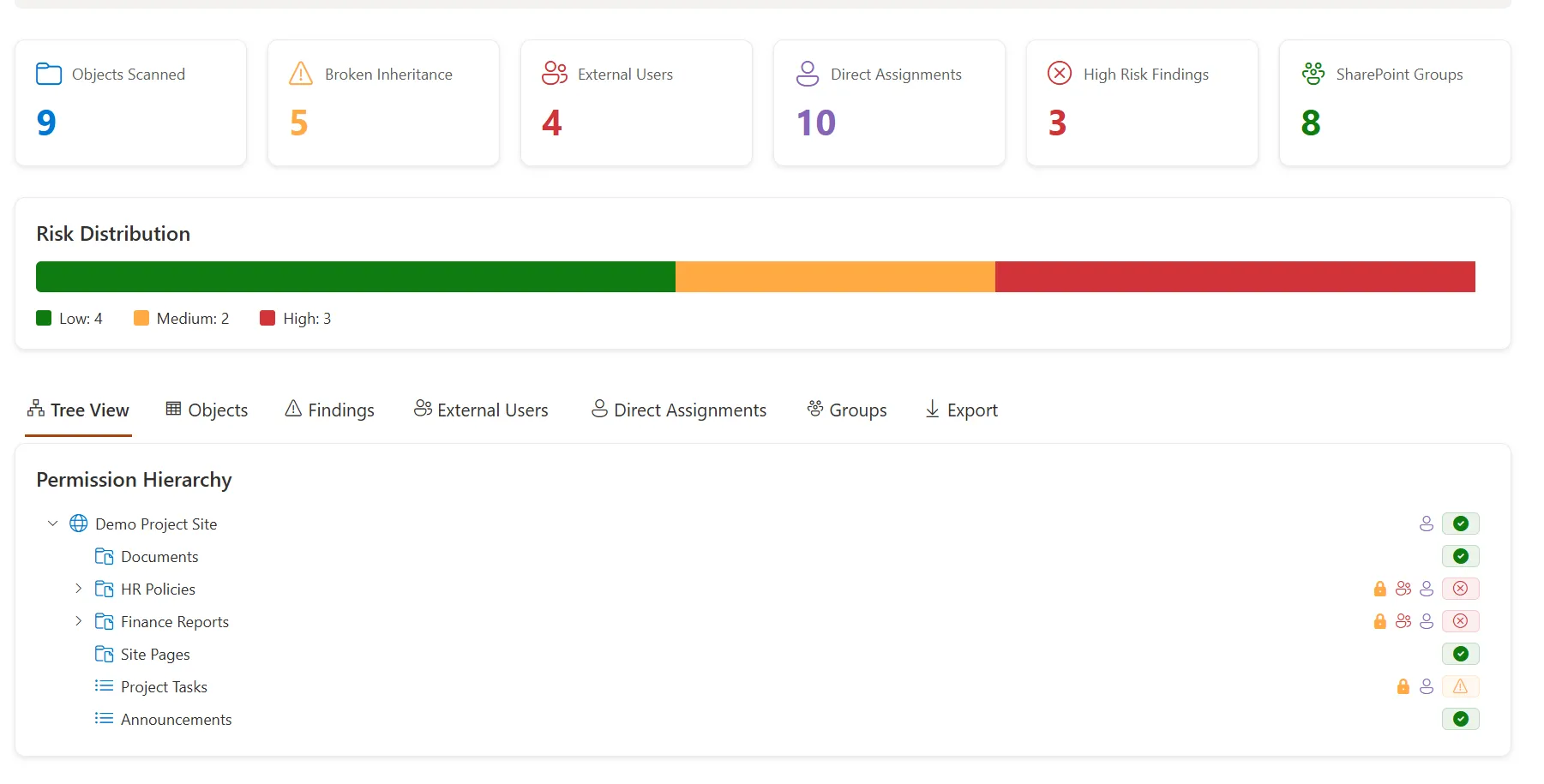
The admin dashboard is designed for visibility.
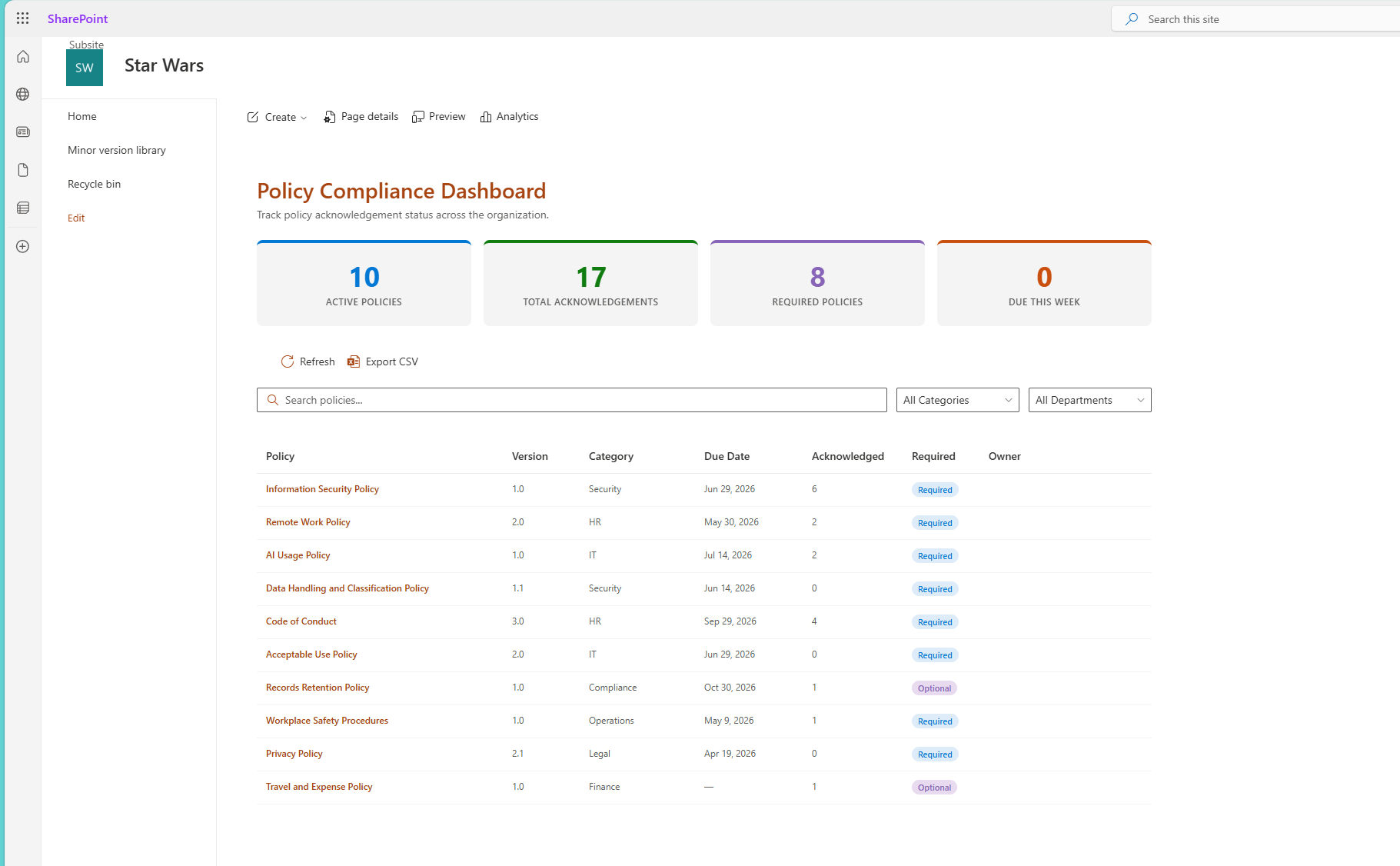
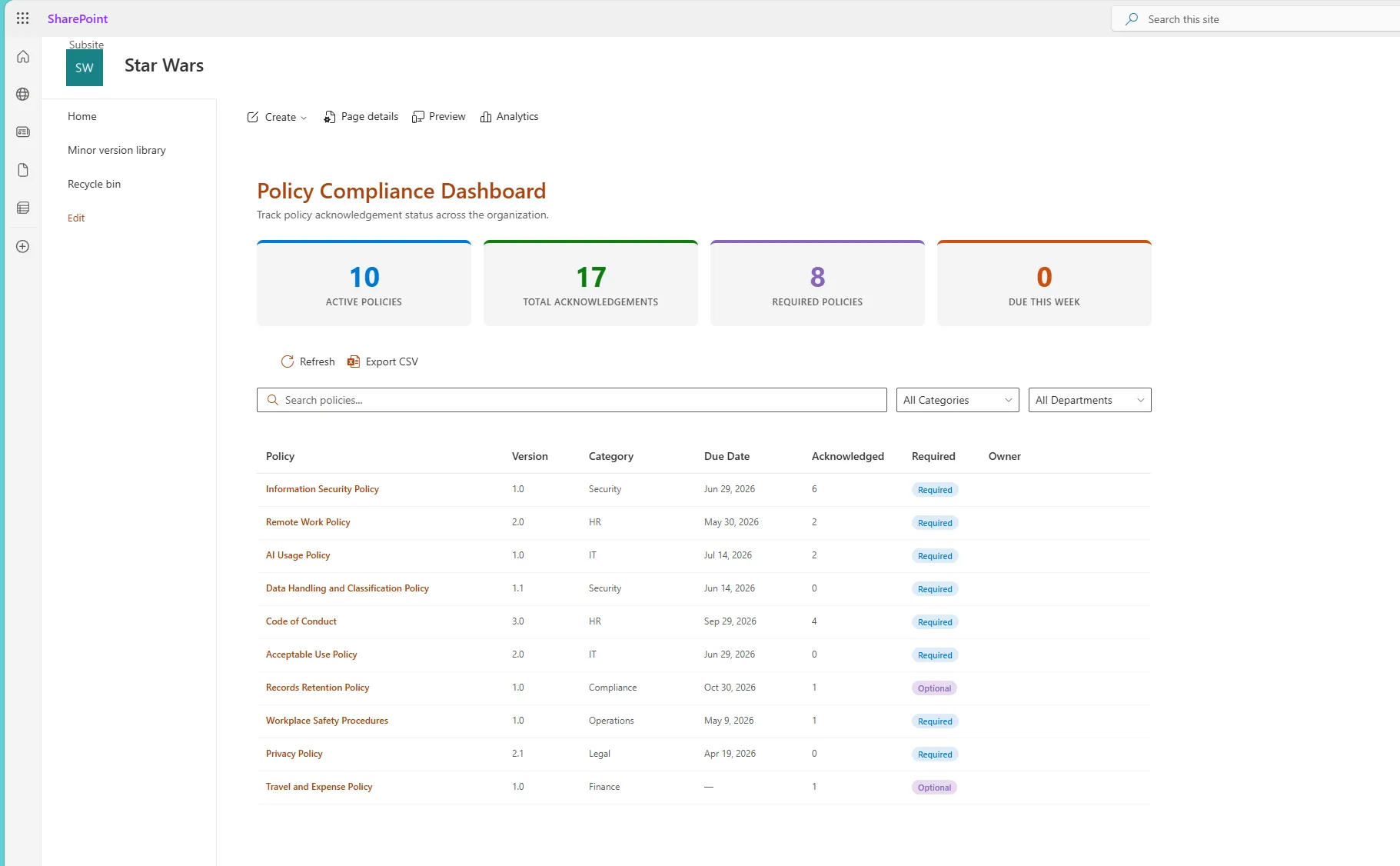
Admin-facing compliance dashboard showing active policies, total acknowledgements, required policies, due items, search, filters, and CSV export.
Policy owners and administrators can review:
- Active policies.
- Completion percentage.
- Overdue acknowledgements.
- Policies due soon.
- Acknowledgement records by department.
- Acknowledgement status by policy.
- Policy version tracking.
- Exportable reporting data.
This is where the project becomes more than a basic SPFx demo. It shows how SharePoint can support real reporting and governance scenarios.
Instead of manually combining spreadsheets, emails, and document libraries, the dashboard gives stakeholders a central place to monitor policy acknowledgement progress.
The project also includes a policy-specific record view so admins can see exactly who acknowledged a selected policy and when.
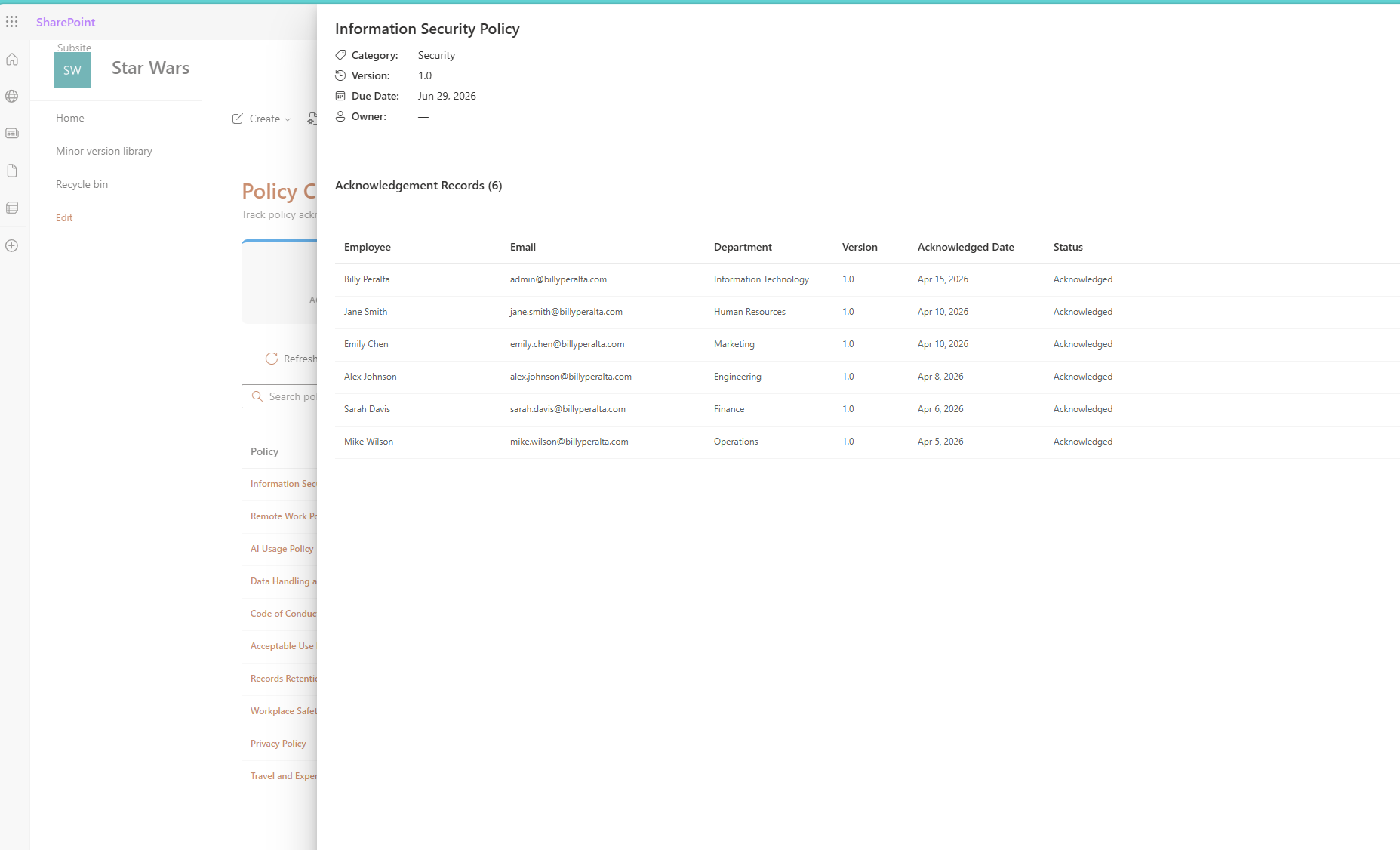
Policy acknowledgement records view showing employee name, email, department, version, acknowledgement date, and status.
Built on SharePoint Lists
The project intentionally uses SharePoint lists as the data layer. This makes the solution easier to understand, easier to deploy, and more realistic for many Microsoft 365 environments.
The main lists are:
- Policy Center - Policies
- Policy Center - Acknowledgements
The Policies list stores information such as:
- Policy title.
- Policy ID.
- Description.
- Category.
- Version.
- Policy document link.
- Policy owner.
- Required/optional status.
- Active status.
- Due date.
- Effective date.
- Expiry date.
- Target departments.
- Acknowledgement text.
- Sort order.
The Acknowledgements list stores each employee acknowledgement record, including:
- Policy lookup.
- Policy title snapshot.
- Policy version.
- Employee.
- Employee email.
- Employee display name.
- Department.
- Job title.
- Acknowledged date.
- Acknowledgement status.
- Due date snapshot.
- Comments.
This structure keeps policy configuration and acknowledgement history separate, which is important for reporting and version tracking.
Version Tracking Matters
One important design decision is that each acknowledgement is tied to a specific policy version.
That means if a policy changes from version 1.0 to version 1.1, the previous acknowledgement should not automatically count as acknowledgement of the new policy version.
This matters for policies such as:
- Information security policies.
- AI usage policies.
- Remote work policies.
- Privacy policies.
- Data handling standards.
- Acceptable use policies.
- Records retention policies.
A policy acknowledgement system should not only answer:
Did this employee acknowledge the policy?
It should also answer:
Did this employee acknowledge the current version of the policy?
That is the type of detail that makes the solution more realistic for enterprise intranet and governance scenarios.
Microsoft Graph and Department Targeting
The project includes optional Microsoft Graph usage to enrich the current user profile with details such as department and job title.
This allows policies to be targeted by department.
For example:
- HR policies can be shown to all employees.
- IT security policies can be shown to everyone.
- Finance policies can be targeted to Finance users.
- Engineering policies can be targeted to Engineering users.
- Manager-specific policies can be targeted to leadership groups in future versions.
This helps demonstrate a common intranet requirement: showing users the right information based on who they are and where they belong in the organization.
Technology Used
The project is built with:
- SharePoint Framework.
- React.
- TypeScript.
- PnPjs.
- Fluent UI React.
- Microsoft Graph.
- SharePoint Online.
- SharePoint lists.
- CSV export support.
- PnP PowerShell provisioning scripts.
The solution is intended to be practical, readable, and extensible for other SharePoint developers who want to learn from or build on the pattern.
Why This Is Useful for SharePoint Intranets
A modern intranet is not only a place for news and links. It should also support employee processes.
Policy acknowledgement is a good example because it connects several important areas:
- Communication.
- Compliance.
- Governance.
- Employee experience.
- Reporting.
- SharePoint information architecture.
- Microsoft 365 extensibility.
This type of solution can help organizations reduce manual tracking and create a better experience for both employees and administrators.
Example Use Cases
This solution pattern can be adapted for many scenarios, including:
- Annual policy acknowledgement.
- New employee onboarding policies.
- Security awareness acknowledgement.
- Remote work policy acknowledgement.
- AI usage policy acknowledgement.
- Department-specific procedure acknowledgement.
- Privacy and data handling acknowledgement.
- Code of conduct acknowledgement.
- Records retention acknowledgement.
- Workplace safety procedure acknowledgement.
The same architecture can also be extended into onboarding checklists, training confirmation, document review tracking, or internal certification workflows.
Why I Open-Sourced It
I open-sourced this project because I wanted to show a practical SharePoint Framework solution that goes beyond a simple demo web part.
This project demonstrates:
- Building SPFx web parts for real intranet scenarios.
- Using SharePoint lists as a configurable data source.
- Designing employee-facing and admin-facing experiences.
- Applying PnPjs for SharePoint data access.
- Using Microsoft Graph for user profile enrichment.
- Creating reusable service layers.
- Thinking through permissions, governance, and reporting.
- Designing for modern SharePoint intranet use cases.
It is also a project I can continue improving with future features such as reminders, group targeting, Viva Connections cards, Power Automate integration, and additional reporting views.
Roadmap Ideas
Some possible future enhancements include:
- Email reminders for overdue acknowledgements.
- Power Automate integration.
- Azure AD group targeting.
- Manager view.
- Bulk acknowledgement reporting.
- Policy owner dashboard.
- Viva Connections Adaptive Card Extension.
- Microsoft Teams notification support.
- Scheduled policy review dates.
- Approval flow for new policy publishing.
- Advanced analytics by department or policy category.
The long-term idea is to make this a reusable intranet compliance pattern for SharePoint Online.
Final Thoughts
The SPFx Policy Acknowledgement Center is a practical example of how SharePoint Online can be extended to support real business processes.
For organizations already using SharePoint as their intranet, this type of solution shows how policy publishing, employee acknowledgement, and compliance reporting can be brought together inside Microsoft 365.
For me, this project is also a way to continue building and sharing practical SharePoint Framework solutions that reflect real-world Microsoft 365 needs: governance, intranet modernization, compliance visibility, and employee experience.
You can view the project on GitHub here: https://github.com/BillySharePoint/spfx-policy-acknowledgement-center
Need a Custom SharePoint Intranet or SPFx Solution?
I help organizations design and build practical SharePoint and Microsoft 365 solutions, including intranet modernization, SPFx web parts, governance dashboards, migration tools, and business process automation.
Need a production-ready SPFx solution?
I build SharePoint Framework web parts, extensions, dashboards, and integrations using React, TypeScript, PnPjs, and Microsoft Graph.
Free SharePoint planning resource
Solving the technical issue is only part of the Microsoft 365 problem.
Use the checklist to review the governance, permission, ownership, and support decisions that often determine whether a SharePoint solution succeeds long term.
Download the ChecklistBilly Peralta
SharePoint & Microsoft 365 Specialist • 16+ Years Experience
If you have questions about your SharePoint environment, feel free to reach out.
Need a production-ready SPFx solution?
I build SharePoint Framework web parts, extensions, dashboards, and integrations using React, TypeScript, PnPjs, and Microsoft Graph.