Building a SharePoint External Sharing Risk Scanner with SPFx
Billy Peralta
June 3, 2026 · 11 min read

TL;DR
I created a public SPFx project that scans the current SharePoint site and displays governance-friendly indicators for:
- External user visibility
- SharePoint group review
- Permission inheritance issues
- Libraries that may need review
- Basic external sharing risk scoring
- Recommended governance actions
The goal is not to replace Microsoft Purview, Microsoft Defender, audit logs, or a formal security assessment. The goal is to give SharePoint site owners, Microsoft 365 admins, consultants, and developers a practical starting point for permission and external sharing conversations.
GitHub: SPFx External Sharing Risk Scanner
Table of Contents
- Why I Built This
- The Real Problem with External Sharing
- What the Tool Does
- Current Public MVP Features
- Technical Stack
- How the Risk Score Works
- Why Permission Inheritance Matters
- Why This Matters for Copilot Readiness
- What This Tool Does Not Replace
- Public Version vs Possible Pro Version
- Lessons Learned While Building This
- How This Can Help Organizations
- Final Thoughts
Introduction
External sharing in SharePoint Online is powerful, but it can also become difficult to review as sites grow.
A site may start clean with a few owners, members, and visitors. Over time, project teams invite guests, libraries break inheritance, folders get shared directly, old groups remain unused, and business users may not always know which content is still exposed outside the organization.
That is the problem I wanted to explore with this project.
I built an open-source SPFx External Sharing Risk Scanner to help surface basic external sharing and permission risk indicators directly inside a SharePoint site.
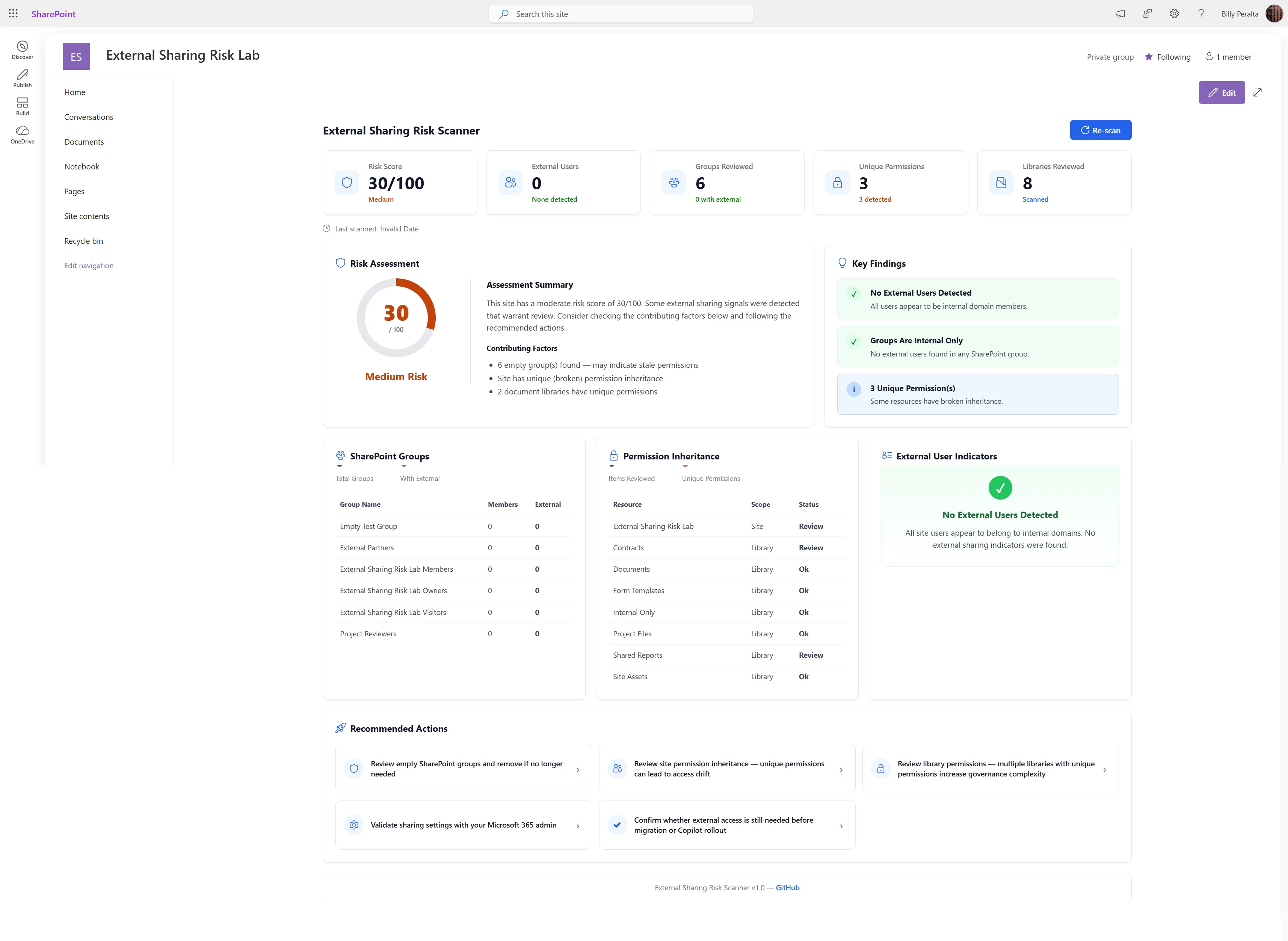
Screenshot
1. Why I Built This
SharePoint permissions can be simple at the beginning of a site lifecycle.
A new site may only have:
- Owners
- Members
- Visitors
- One document library
- A small number of users
- No guests
- No broken inheritance
But real SharePoint environments rarely stay that clean.
As sites become active, users create libraries, share folders, add guests, invite vendors, create Teams-connected workspaces, and sometimes break permission inheritance for valid business reasons.
That is not automatically bad.
The risk appears when nobody knows what changed.
This project was built to answer a practical question:
Can an SPFx web part help site owners and admins quickly see permission and external sharing indicators before they become larger governance issues?
2. The Real Problem with External Sharing
External sharing is not the problem by itself.
Many organizations need external sharing for legitimate business reasons:
- Vendor collaboration
- Client document review
- Partner workspaces
- Project delivery
- Contract review
- Field operations
- Cross-organization collaboration
The issue is visibility.
Organizations often struggle with questions like:
- Which SharePoint groups are empty or stale?
- Are external users present in site groups?
- Which libraries have unique permissions?
- Has permission inheritance been broken?
- Are site owners aware of the current sharing posture?
- Should this site be reviewed before migration?
- Should permissions be cleaned up before Microsoft 365 Copilot rollout?
- Is external sharing still needed for this workspace?
These are practical governance questions, not just technical questions.
3. What the Tool Does
The SPFx External Sharing Risk Scanner is a SharePoint Framework web part that runs inside a SharePoint Online site and presents a dashboard-style view of permission and external sharing indicators.
The current public MVP focuses on the current site context.
It shows:
- A visual risk score
- External user indicators
- SharePoint group scan summary
- Permission inheritance indicators
- Libraries that may need review
- Key findings
- Recommended actions
- A read-only governance dashboard experience
The design goal is to make the result understandable for both technical and non-technical users.
A SharePoint developer may care about API calls and permission models.
A site owner may care about the simple question:
Do I need to review this site?
The dashboard tries to support both audiences.
4. Current Public MVP Features
The public version currently includes the following MVP capabilities.
Risk Score
The tool displays a numeric risk score with a simple risk label.
Example:
30 / 100
Medium Risk
The score is meant to help users quickly understand whether the site looks clean, needs review, or contains indicators that should be investigated.
The score should be treated as a governance indicator, not a final security conclusion.
Scan Summary
The scan summary highlights the most important values from the current scan:
- External users found
- SharePoint groups reviewed
- Libraries reviewed
- Unique permission sets
This gives a quick overview before the user reviews the detailed sections.
Key Findings
The key findings section provides plain-language results such as:
- No external users detected
- No external domains configured
- Libraries need review
- Groups reviewed
This section is intentionally written in a way that a business user or site owner can understand.
SharePoint Groups
The SharePoint Groups section summarizes the site groups scanned.
It includes:
- Group name
- Member count
- Possible external users
- Status
This helps identify groups that may be empty, stale, or worth reviewing.
Permission Inheritance
The Permission Inheritance section shows libraries and whether inheritance appears to be inherited or broken.
This is important because unique permissions are one of the most common sources of SharePoint governance complexity.
External User Indicators
The External User Indicators section summarizes possible external access signals from the scan.
This section is intentionally careful with wording because detecting external access accurately may depend on tenant configuration, internal domain settings, guest patterns, and which APIs are available to the solution.
Recommended Actions
The Recommended Actions section translates the scan results into practical next steps.
Examples include:
- Review empty SharePoint groups
- Review site permission inheritance
- Review library permissions
- Validate sharing settings with a Microsoft 365 admin
- Confirm whether external access is still needed before migration or Copilot rollout
- Review sharing links and cross-tenant risks
This is important because a tool should not only show a risk. It should help the user understand what to do next.
5. Technical Stack
The project is built as a SharePoint Framework solution.
Current intended stack:
- SharePoint Framework (SPFx 1.22.x)
- React 17.0.1
- TypeScript
- SharePoint Online
- SharePoint REST APIs where appropriate
- Microsoft Graph where appropriate
- PnPjs where useful
- SCSS module styling
- Read-only dashboard design
For modern SPFx development, Microsoft’s compatibility guidance currently lists SPFx 1.22.x with Node.js v22 LTS and React 17.0.1 compatibility.
Reference:
6. How the Risk Score Works
The risk score in the public MVP is intentionally simple.
It is not designed to be a full security scoring engine.
Instead, it helps convert multiple permission and sharing indicators into a readable site-level signal.
Possible scoring factors include:
- External users detected
- Empty or stale SharePoint groups
- Libraries with unique permissions
- Broken permission inheritance
- Missing internal domain configuration
- Libraries needing review
- Governance findings from the scan
A simple score helps create a conversation.
For example:
- Low risk — The site appears clean based on the indicators available.
- Medium risk — The site has some permission or governance indicators worth reviewing.
- High risk — The site may have multiple external sharing or permission complexity indicators that should be reviewed.
The important part is not the number by itself.
The value is in the context around the number.
7. Why Permission Inheritance Matters
Permission inheritance is one of the most important areas to review in SharePoint Online.
A site can look simple at the top level while certain libraries, folders, or files have unique permissions underneath.
This can happen for valid reasons.
Examples:
- A contracts library should only be visible to Legal
- A folder should be shared with an external vendor
- A project library should have restricted access
- HR or finance content needs tighter permission boundaries
But it can also create long-term problems:
- Site owners may not know permissions were changed
- Users may retain access longer than needed
- Migration teams may copy old permission problems into a new environment
- Support teams may spend more time troubleshooting access issues
- Copilot readiness reviews may uncover oversharing late in the process
That is why the tool highlights libraries with broken inheritance or unique permissions.
Not because unique permissions are always wrong.
Because they should be intentional, documented, and reviewed.
8. Why This Matters for Copilot Readiness
Microsoft 365 Copilot makes permission hygiene even more important.
Copilot does not magically give users access to content they could not already access. However, it can make discoverable content easier to surface through natural language prompts and search-like experiences.
That means old permission decisions matter more.
If a user already has access to content they should not have, better discovery can make that issue more visible.
This is why organizations preparing for Copilot should review:
- Overshared sites
- Stale permissions
- Guest access
- External sharing settings
- Broken inheritance
- Large groups with broad access
- Sensitive content stored in collaborative workspaces
A tool like this does not complete a Copilot readiness assessment, but it can support the early conversation.
It helps identify where a site may need closer review.
9. What This Tool Does Not Replace
This project is not intended to replace enterprise security or compliance tooling.
It does not replace:
- Microsoft Purview
- Microsoft Defender
- SharePoint Admin Center reports
- Entra ID access reviews
- Audit log investigations
- Data loss prevention policies
- Sensitivity labels
- Formal security assessments
- Legal or compliance reviews
The scanner is a practical site-level helper.
It is designed to make permission and sharing review easier to start.
For a full governance review, results should be validated with tenant-level tools, audit logs, admin center settings, and organization-specific policies.
10. Public Version vs Possible Pro Version
The current GitHub repository is the free public version.
Public GitHub repository: SPFx External Sharing Risk Scanner
The public version is intended to demonstrate the core concept and provide a useful starting point for the SharePoint community.
A private Pro version may be created later for organizations, consultants, or teams that need deeper examples or tenant-specific customization.
Possible Pro features could include:
- Advanced risk scoring
- CSV export
- Excel export
- More detailed library scanning
- More detailed sharing link analysis
- Tenant-specific configuration options
- Governance checklist templates
- More Microsoft Graph examples
- Admin-focused deployment notes
- Client-specific customization guidance
For now, the Pro version is available by request only.
If someone needs help adapting the tool for a tenant, the best path is to contact me directly.
11. Lessons Learned While Building This
A governance tool needs to be readable
A raw table is not enough.
Site owners and admins need a summary that helps them understand what matters.
That is why the dashboard includes:
- Scorecards
- Key findings
- Status labels
- Recommended actions
- Plain-language descriptions
Permission data needs careful wording
Permission and sharing data can be nuanced.
A web part should avoid making claims that are too absolute unless the scan logic can fully support them.
For example, “possible external users” may be safer than “all external users” depending on how the detection logic works.
Empty groups are still useful findings
Empty SharePoint groups may not be high security risks, but they can indicate stale configuration.
A clean governance review should include whether groups are still needed.
Broken inheritance is not always bad
Unique permissions are common in real organizations.
The tool should not shame every broken inheritance scenario.
Instead, it should highlight where review is needed.
Recommended actions matter
A dashboard should not stop at “something is wrong.”
It should help answer:
What should I review next?
That is why the recommended actions section is important.
12. How This Can Help Organizations
This type of tool can support several common SharePoint and Microsoft 365 scenarios.
Governance Reviews
Microsoft 365 admins can use it as a lightweight site-level review tool to start permission conversations with site owners.
Migration Planning
Migration teams can use it to identify sites that may need cleanup before moving content.
This is useful because migrating bad permissions often means carrying old problems into a new environment.
Copilot Readiness
Organizations preparing for Microsoft 365 Copilot can use it as one input when reviewing oversharing and permission hygiene.
Site Owner Education
The dashboard can help non-technical users understand why external sharing and permission inheritance matter.
Consultant Discovery
M365 consultants can use the project as an example of how technical SharePoint data can be turned into business-friendly governance insights.
Final Thoughts
This project started from a practical SharePoint governance problem:
External sharing and permission inheritance can become difficult to understand after a site has been used for a while.
The first public version is not meant to solve every governance issue.
It is meant to create visibility.
That visibility can help start better conversations between site owners, admins, security teams, migration teams, and business stakeholders.
For me, this project also represents the kind of SharePoint and Microsoft 365 work I enjoy building: practical tools that connect technical implementation with real organizational problems.
If you want to review the code, the public project is available here:
GitHub: SPFx External Sharing Risk Scanner
If you are interested in a more advanced version or need help adapting this type of solution for your Microsoft 365 tenant, feel free to contact me.
Need a production-ready SPFx solution?
I build SharePoint Framework web parts, extensions, dashboards, and integrations using React, TypeScript, PnPjs, and Microsoft Graph.
Free SharePoint planning resource
Solving the technical issue is only part of the Microsoft 365 problem.
Use the checklist to review the governance, permission, ownership, and support decisions that often determine whether a SharePoint solution succeeds long term.
Download the ChecklistBilly Peralta
SharePoint & Microsoft 365 Specialist • 16+ Years Experience
If you have questions about your SharePoint environment, feel free to reach out.
Need a production-ready SPFx solution?
I build SharePoint Framework web parts, extensions, dashboards, and integrations using React, TypeScript, PnPjs, and Microsoft Graph.