Building a SharePoint Permission Visualizer with SPFx
Billy Peralta
May 8, 2026
TL;DR
I built a new open source SharePoint Framework project called SPFx Permission Visualizer. It is a read-only dashboard that helps SharePoint admins visualize permission structure, broken inheritance, external users, direct assignments, SharePoint groups, and permission risk from a modern web part experience. The goal is to make SharePoint permission review easier to start.
GitHub: SPFx Permission Visualizer
Table of Contents
- Why SharePoint Permissions Become Hard to Manage
- The Real Problem: Visibility
- What I Built
- Key Features
- Why I Kept It Read-Only
- Technical Approach
- Why SPFx Is a Good Fit
- The Governance Angle
- The Migration Angle
- What I Learned from Building It
- Possible Future Enhancements
- Who This Project Is For
- Final Thoughts
Introduction
SharePoint permission cleanup is one of those tasks that sounds simple until you actually open the site.
At first, everything may look normal. A few owners. A few members. A few visitors.
Then you start looking deeper.
A document library has unique permissions. A folder inside that library has different permissions. A few users were granted access directly. Some external users were added months ago. A custom SharePoint group exists, but nobody remembers why. A migration project is coming up, and now everyone wants to know who actually has access to what.
That is the problem I wanted to solve with my latest open-source project: SPFx Permission Visualizer.
1. Why SharePoint Permissions Become Hard to Manage
Most SharePoint permission problems do not happen overnight. They build up slowly.
Someone needs temporary access to a document library. A department creates a folder with unique permissions. A manager shares a file externally. A user is added directly instead of through a group. A project site changes owners, but the old owners are never removed. A library gets copied or migrated without a full permission review.
Each individual change may seem harmless at the time. The problem is that these small changes accumulate.
Eventually, the site owner or SharePoint admin is left with a site where the permission model is no longer easy to explain.
That creates real business risk. For example:
- Users may retain access longer than they should.
- External users may remain in the site after a project ends.
- Direct user permissions become difficult to audit.
- Broken inheritance makes cleanup more complicated.
- Migration projects become harder to scope.
- Compliance reviews take longer.
- Site owners lose confidence in who can access sensitive content.
This is why permission visibility matters. Before an organization can clean up SharePoint permissions, it first needs to understand where the complexity exists.
2. The Real Problem: Visibility
SharePoint gives admins ways to inspect permissions, but the experience can be very manual.
You may need to open the site permissions page, check groups, review members, inspect a library, check advanced permissions, then repeat the process for lists, folders, and items.
That approach works for small sites. It becomes painful when the site has many lists, libraries, folders, unique permission breaks, and external users.
The goal of this project is not to replace SharePoint’s built-in permission model. The goal is to make permission review easier to start.
Instead of forcing an admin to manually inspect every area first, the web part gives a dashboard view that highlights where attention is needed.
3. What I Built
SPFx Permission Visualizer is a read-only SharePoint Framework solution focused on permission visibility and risk review.
The web part helps answer questions like:
- Which objects were scanned?
- Which lists or libraries have broken inheritance?
- Where are external users present?
- Which users have direct permissions?
- Which SharePoint groups exist?
- Which areas should be reviewed first?
- Which objects appear low, medium, or high risk?
The first version focuses on the current SharePoint site. That was intentional.
Tenant-wide permission scanning can become much more complex, especially when dealing with throttling, admin permissions, Graph permissions, scale, reporting storage, and long-running jobs. For this project, I wanted version 1 to be practical, understandable, and useful inside a single SharePoint site.
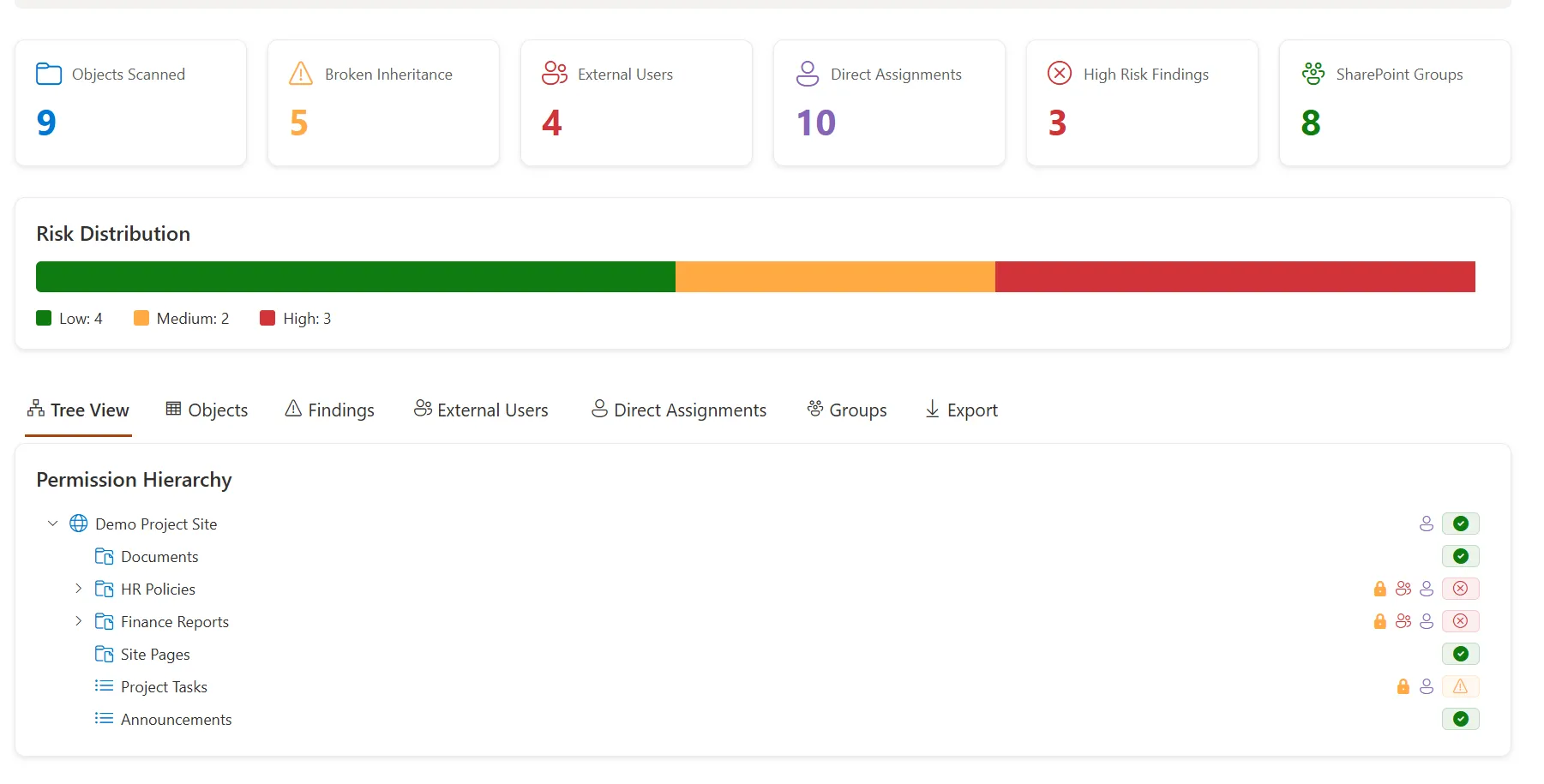
Screenshot
The dashboard provides a quick summary of the permission state of the current site.
4. Key Features
Permission Summary Dashboard
The dashboard starts with high-level metrics so an admin can quickly understand the site’s permission health.
The summary includes:
- Objects scanned
- Broken inheritance
- External users
- Direct assignments
- High-risk findings
- SharePoint groups
This is useful because admins often need a quick answer before going into details.
For example, if a site has a high number of broken inheritance points and direct assignments, that usually means the site needs deeper permission review before a migration or governance cleanup.
Risk Distribution
The risk distribution section separates scanned objects into low, medium, and high risk.
This helps turn raw permission data into something easier to understand. Not every unique permission break is automatically a disaster. Some unique permissions are intentional.
But a combination of unique permissions, external users, direct assignments, and sensitive content areas can indicate a higher review priority.
The risk model is not meant to replace human judgment. It is meant to help admins prioritize where to look first.
Permission Hierarchy Tree
One of my favorite parts of the project is the permission hierarchy view.
The tree helps visualize the structure of the site. For example:
Demo Project Site
├── Documents
├── HR Policies
├── Finance Reports
├── Site Pages
├── Project Tasks
└── Announcements
Each object can show indicators for permission status, such as:
- Healthy or low-risk status
- Broken inheritance
- External users
- Direct assignments
- Review warnings
- High-risk findings
This makes the permission review process more visual. Instead of only looking at a flat table, admins can see how permission complexity appears across the site structure.
Objects View
The objects view is designed to help admins review the scanned SharePoint objects in a more structured way.
Examples of objects include:
- Site
- Lists
- Libraries
- Folders
- Items, depending on scan configuration
For each object, the tool can show useful details such as:
- Object name
- Object type
- Permission inheritance status
- Risk level
- External user indicators
- Direct assignment indicators
- Related findings
This view is useful when an admin needs a more detailed list after checking the dashboard summary.
Findings View
The findings view is where permission issues become more actionable.
Instead of only showing raw permission data, the web part can highlight findings such as:
- Broken permission inheritance
- External users detected
- Direct user assignments
- High-risk permission patterns
- SharePoint groups that may need review
A finding should not only say what was detected. It should also help the admin understand why it matters.
For example, a direct assignment finding might recommend reviewing whether that user should be moved into a SharePoint group or security group. That makes the tool more useful for real governance work.
External Users View
External sharing is useful, but it needs to be reviewed.
Over time, external users can remain in SharePoint sites long after a project, vendor relationship, or collaboration period has ended.
The external users view helps admins quickly identify guest or external access across the scanned site. This can support:
- Security reviews
- Compliance checks
- External sharing cleanup
- Migration readiness
- Site owner reviews
The goal is not to say that every external user is a problem. The goal is to make external access visible so it can be reviewed intentionally.
Direct Assignments View
Direct user permissions are another common source of long-term SharePoint complexity.
When access is granted directly to individual users, it can become harder to manage, audit, and remove later. Group-based access is usually easier to maintain.
The direct assignments view helps identify users who may have been assigned permissions directly to a site, list, library, folder, or item. This is especially helpful during:
- Permission cleanup
- Site ownership review
- Migration planning
- Access recertification
- Security review
Again, direct permissions are not always wrong. But they should be visible.
SharePoint Groups View
SharePoint groups are still a major part of many SharePoint permission models.
The groups view helps admins understand which groups exist and how they are being used. This can include:
- Owners
- Members
- Visitors
- Custom groups
- Group membership patterns
- Groups that may need review
Group visibility is important because many permission issues are not only about individual users. Sometimes the bigger issue is that the group itself is unclear, outdated, too broad, or no longer owned properly.
Export
Permission reviews often need to leave the web part.
Admins may need to share findings with site owners, project managers, security teams, or migration teams. That is why export matters.
Exported data can support:
- Governance reporting
- Permission cleanup planning
- Migration assessment
- Security review
- Documentation
- Stakeholder conversations
A dashboard is useful for visibility. An export is useful for action.
5. Why I Kept It Read-Only
One important design decision for this project is that version 1 is read-only.
The solution does not automatically:
- Remove users
- Change permissions
- Break inheritance
- Restore inheritance
- Delete groups
- Modify group membership
- Grant access
- Revoke access
That was intentional.
Permission cleanup is sensitive. A tool that modifies permissions needs more guardrails, approvals, logging, and testing.
For version 1, I wanted the project to focus on visibility, review, and reporting. That makes it safer for admins to use and easier to evaluate as an open-source project.
6. Technical Approach
This project uses:
- SharePoint Framework
- React
- TypeScript
- Fluent UI
- PnPjs
- SharePoint REST API
- Modern SharePoint Online
The web part is designed to run inside a SharePoint Online site and analyze permission-related data available to the current user.
For best results, the user should be a Site Owner or SharePoint Administrator. Users with lower permissions may see partial results depending on what they are allowed to access.
7. Why SPFx Is a Good Fit
SPFx is a good fit for this kind of project because it runs directly inside SharePoint.
That means the experience is close to where admins and site owners already work. Instead of asking a user to open a separate admin tool, the web part can be added to a modern SharePoint page and used as part of a site governance or admin dashboard.
SPFx also allows the project to use familiar Microsoft 365 development patterns:
- React components
- TypeScript models
- Fluent UI controls
- PnPjs for SharePoint data access
- SharePoint context for the current site
For a portfolio project, this also demonstrates both development and SharePoint administration knowledge. That combination is important. A SharePoint developer should not only know how to build UI components. They should also understand the platform problems those components are solving.
8. The Governance Angle
This project fits into a larger SharePoint governance story.
Good governance is not just policy documentation. It also requires visibility.
A governance team needs to know:
- Which sites are risky
- Which permissions are complex
- Which external users still have access
- Which content areas have unique permissions
- Which site owners need to take action
- Which areas should be cleaned up before migration
That is why a permission visualizer can be valuable. It gives admins a starting point for review. It does not replace governance decisions, but it gives teams better information before making those decisions.
9. The Migration Angle
Permissions are also one of the most important parts of SharePoint migration planning.
A content migration is not just about moving files. It is also about deciding what should happen to permissions.
Before migrating a site, teams should ask:
- Should these unique permissions be preserved?
- Should old direct assignments be removed?
- Should external users still have access?
- Should inactive groups be cleaned up?
- Should permissions be simplified before migration?
- Should sensitive libraries be reviewed separately?
If permissions are ignored until the end of a migration project, cleanup becomes harder. A tool like this can help identify permission complexity earlier.
10. What I Learned from Building It
Building this project reinforced a few important SharePoint lessons.
Permission visibility is just as important as permission control
Admins cannot clean up what they cannot see. A read-only dashboard can still provide a lot of value if it helps teams understand risk faster.
Not all permission risk is equal
A site with one intentional unique permission break is different from a site with many direct assignments, external users, and sensitive libraries. Risk should be treated as a prioritization tool, not an automatic judgment.
User experience matters for admin tools
Admin tools should not only expose data. They should make the data easier to act on. That is why the project includes summary cards, risk distribution, tree view, tabs, indicators, and export options.
Read-only is a good first version
It is tempting to add cleanup buttons immediately. But for permissions, visibility should come first. Automatic cleanup can come later only if the right safety controls are in place.
11. Possible Future Enhancements
This project can grow in several directions. Some ideas include:
- Tenant-wide permission scanning
- Microsoft Graph enrichment
- Sharing link detection
- Anonymous link detection
- Sensitivity label awareness
- Export to Excel
- PDF report generation
- Permission history comparison
- Scheduled scan snapshots
- Microsoft Lists integration for review tracking
- Viva Connections Adaptive Card Extension
- Teams tab version
- Power Automate approval workflow for permission review
For now, the current version focuses on the most important foundation: making SharePoint permission structure easier to understand.
12. Who This Project Is For
This project may be useful for:
- SharePoint admins
- Microsoft 365 admins
- SharePoint developers
- Intranet owners
- Migration consultants
- Governance teams
- Security reviewers
- Site owners who need better permission visibility
It is especially useful for teams that want to review permissions before a migration, audit, cleanup, or site ownership transition.
Final Thoughts
SharePoint permission problems are rarely caused by one big mistake. They usually come from years of small access changes that no one had time to review.
That is why visibility matters.
With SPFx Permission Visualizer, my goal was to build a practical open-source tool that helps admins see permission complexity faster and start better cleanup conversations.
It is not meant to replace SharePoint admin judgment. It is meant to support it.
If you work with SharePoint permissions, governance, or migration planning, feel free to check out the project on GitHub:
View the SPFx Permission Visualizer on GitHub
See More Open Source SharePoint Projects
This project pairs well with my SharePoint Site Governance Dashboard and Migration Scoping Toolkit because permission complexity is often one of the biggest blockers during governance cleanup and Microsoft 365 migration planning.
Need a production-ready SPFx solution?
I build SharePoint Framework web parts, extensions, dashboards, and integrations using React, TypeScript, PnPjs, and Microsoft Graph.
Billy Peralta
SharePoint & Microsoft 365 Specialist • 16+ Years Experience
If you have questions about your SharePoint environment, feel free to reach out.
Need a production-ready SPFx solution?
I build SharePoint Framework web parts, extensions, dashboards, and integrations using React, TypeScript, PnPjs, and Microsoft Graph.