SPFx vs Power Apps for SharePoint Intranets: Maintainable Customizations for the Next 5 Years

17 min read

Alina Grubnyak on Unsplash
Topics: SPFx, Power Apps, SharePoint intranet, governance
Modern SharePoint intranets rarely stay vanilla for long.
Within a year or two, most organizations have a mix of SPFx web parts, embedded Power Apps, JSON column formatting, and a few lingering script editor solutions that somehow survived migration. It works – until it doesn’t.
When a key developer leaves, or Microsoft changes Power Apps licensing, or the SharePoint framework gets a major update, that patchwork becomes a liability. Critical pages break, nobody knows who owns which app, and platform upgrades keep getting pushed back.
At the same time, Copilot and agentic experiences are coming into everyday SharePoint and Power Apps usage. Customizations that were “good enough” a few years ago may now block AI adoption, governance improvements, or intranet redesigns.
This post is for IT directors, SharePoint admins, Microsoft 365 architects, and development leads who need a clear, governance‑aware way to choose between SPFx and Power Apps for intranet scenarios – so the intranet you build today is still supportable and cost‑effective five years from now.
TL;DR
- Use SPFx when you need deeply integrated, branded, performant intranet experiences, precise control over Graph and REST APIs, or reusable components that behave like native SharePoint.
- Use Power Apps when your primary need is business forms, relatively fast delivery, business‑owned logic, and you can live with its UX and licensing model.
- Treat SPFx as code with full DevOps (Git, pipelines, app catalog) and treat Power Apps as applications with environment, solution, and maker governance.
- Before approving a new intranet customization, require: clear ownership, support model, ALM approach, licensing impact review, and a lifecycle plan.
Table of Contents
- Why SPFx vs Power Apps Matters Now
- What SPFx and Power Apps Actually Do for Your Intranet
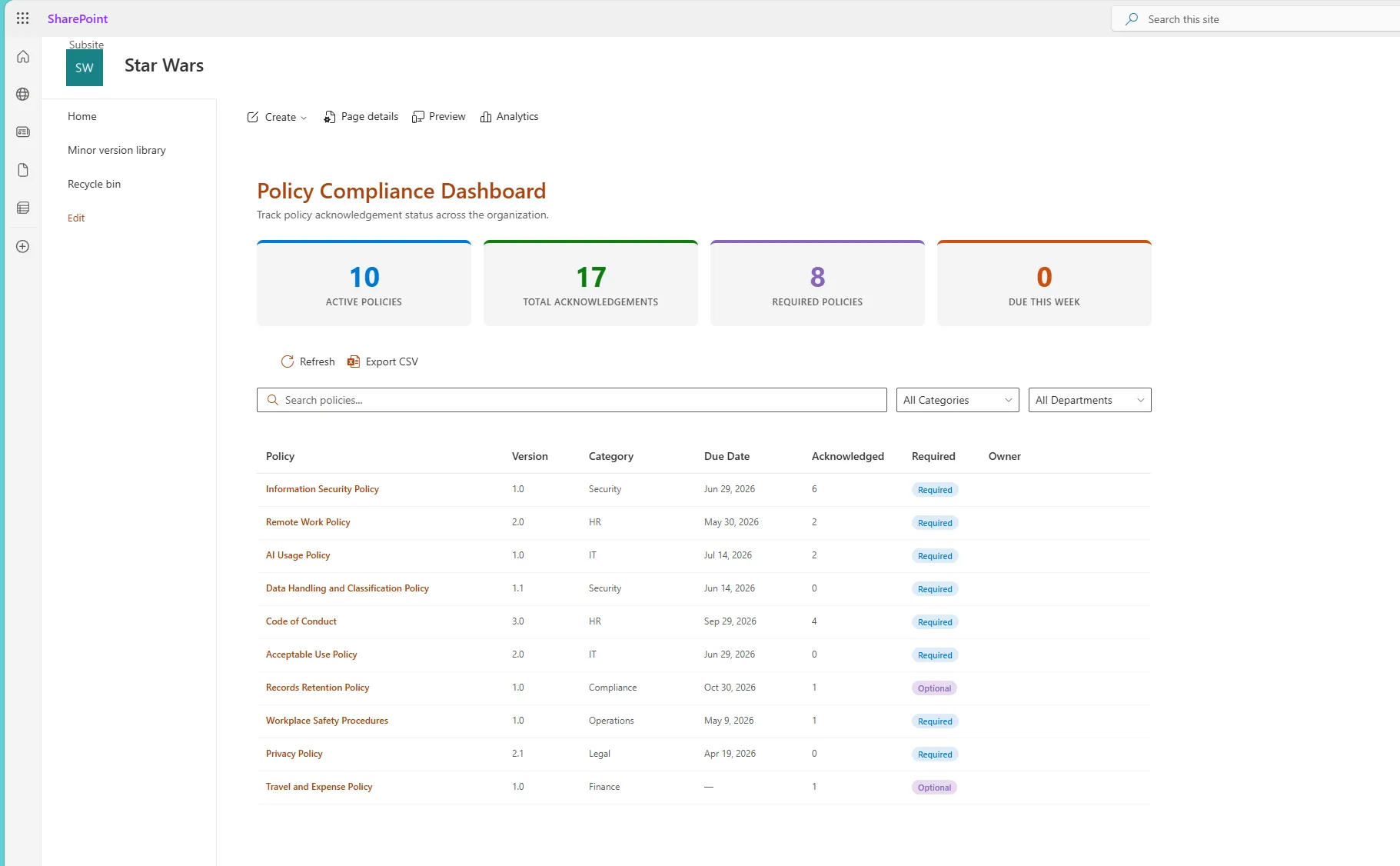
- Real-World Scenario: Policy Acknowledgement Center
- Decision Framework: When to Choose SPFx vs Power Apps
- Common Failure Patterns and Risks
- Technical Recommendations
- Copilot and the Future SharePoint Experience
- Business Impact
- Practical Approval Checklist for New Intranet Customizations
- Final Thoughts
Why SPFx vs Power Apps Matters Now
The SPFx vs Power Apps choice is no longer just a developer preference. It is a strategic platform decision.
A few patterns I keep seeing in intranet modernization projects:
- The intranet home page is driven by SPFx web parts, but key processes (requests, approvals, policy acknowledgements) live in Power Apps embedded on library pages.
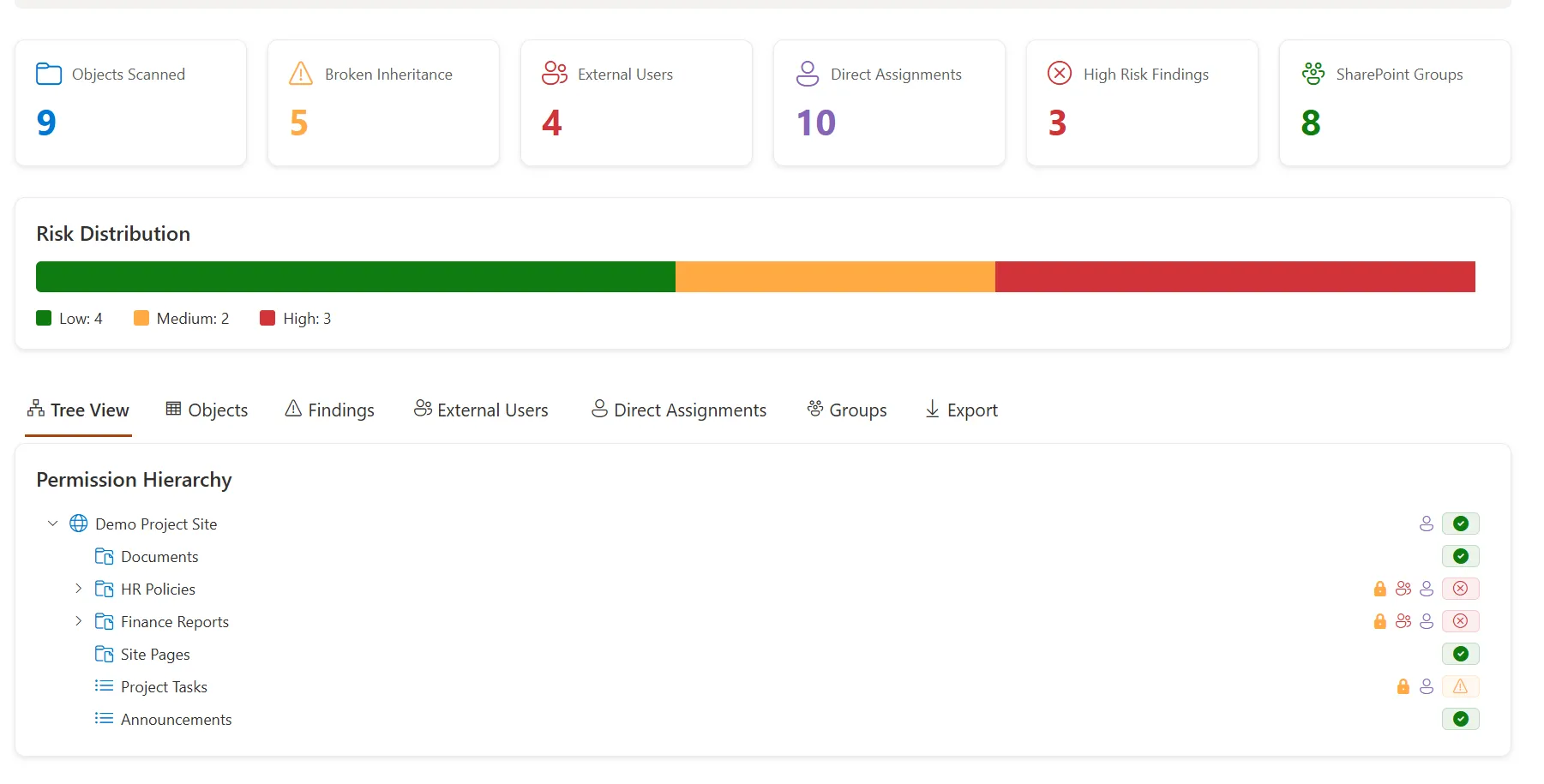
- Governance dashboards, permission visualizers, and analytics are built as SPFx solutions (often inspired by projects like the SharePoint Site Governance Dashboard).
- Business‑critical forms are implemented as Power Apps in the default environment, sometimes attached to SharePoint lists, with no ALM and unclear ownership.
- Customizations were built over several years by different people, using different patterns. Nobody has a full map.
This matters because:
- Supportability over 3–5 years: SPFx relies on modern web development skills and DevOps. Power Apps relies on platform governance, licensing, and maker discipline. The resources you have – and keep – will decide what is maintainable.
- Copilot and agentic features: As covered in AI in SharePoint Is Moving From Search to Action, Copilot will increasingly interact with your customizations. Poorly governed apps and extensions will either be hidden from AI or become unexpected data exposure points.
- Upgrade risk: SPFx changes with Node, React, and SharePoint framework updates. Power Apps changes with Power Platform releases and licensing. A poorly designed solution in either space can delay key platform upgrades.
- Total cost of ownership (TCO): Power Apps licensing and environment design can turn a small app into a recurring cost. SPFx customizations can accumulate governance debt that later requires expensive re‑engineering.
What SPFx and Power Apps Actually Do for Your Intranet
Before we decide, we need an honest understanding of what each tool is best suited for.
SPFx (SharePoint Framework)
SPFx gives you:
- Web parts and extensions for modern SharePoint pages: dashboards, cards, navigation, header/footer customizations, command bar injections.
- Full control over UX: React components, custom CSS, responsive layouts, integration with the SharePoint design system.
- Direct access to SharePoint REST and Microsoft Graph (subject to app catalog and admin approval), ideal for governance tools, analytics, and cross‑site experiences.
- Deployment via tenant or site app catalog, versioned packages, and alignment with Git/Azure DevOps.
It shines when you:
- Need pixel‑perfect, branded intranet experiences.
- Want reusable components across sites (e.g., a governance widget or policy banner).
- Require complex integration with Graph, external APIs, or advanced permissions logic.
- Have or plan to build a proper dev team and ALM.
For more on SPFx future direction, see SPFx Roadmap 2026.
Power Apps (primarily Canvas Apps for SharePoint)
Power Apps gives you:
- Rapid form and app creation on top of SharePoint lists and other data sources.
- Business‑friendly logic with formulas, galleries, and controls that many power users can learn.
- Integration with Power Automate for workflows and approvals.
- Deployment through environments and solutions, and embedding within SharePoint pages or lists.
It shines when you:
- Need custom forms and business processes more than highly polished UX.
- Want business teams to manage and evolve logic (with governance).
- Need to iterate quickly and test concepts before investing in full development.
- Have a Power Platform governance model already in place.
Power Apps is also evolving, as covered in Power Apps Is Becoming Agentic. Agentic features will increase automation, but also governance complexity.
Real-World Scenario: Policy Acknowledgement Center
Policy acknowledgement is a classic intranet use case that forces a choice between SPFx and Power Apps.
Imagine a global organization redesigning its SharePoint intranet. Compliance wants a central “Policy Acknowledgement Center” where employees:
- See all policies relevant to them.
- Read each policy in a consistent viewer.
- Acknowledge with an electronic signature or checkbox.
- Have their acknowledgements tracked as records for audits.
- Receive reminders until they complete required policies.
The intranet team proposes two options.
Option A: SPFx‑based Policy Center
They consider an SPFx solution similar to the open source SPFx Policy Acknowledgement Center:
- A custom SPFx web part on a central intranet page showing required policies per user.
- Integration with SharePoint lists to store policy metadata and acknowledgement records.
- Graph calls to personalize content and show assignment by role or department.
- A modern, branded UI that looks like part of the intranet, not an embedded app.
Governance and ALM:
- Code lives in Git (with pull requests and reviews).
- CI/CD deploys packaged solutions to the tenant app catalog.
- Graph permissions are explicitly requested and reviewed (e.g., via
webApiPermissionRequests). - Upgrades to SPFx (e.g., 1.22) follow a defined test checklist (see SPFx 1.22: Upgrade Checklist).
Pros:
- Excellent user experience and performance.
- Clear ownership in the dev team.
- Easy reuse of components across sites.
Cons:
- Requires ongoing developer capacity.
- Changes involve code updates and deployments.
Option B: Power Apps‑based Policy Center
Alternatively, a Power Apps canvas app:
- Uses SharePoint lists as data sources for policies and acknowledgements.
- Is embedded on a central SharePoint page.
- Handles logic for required vs optional policies, filtering by user.
- Connects with Power Automate for reminder flows.
Governance and ALM:
- App is built in a Production Power Platform environment.
- Managed solution is used to move changes from Dev to Test to Prod (aligned with Power Apps and Power Automate DevOps).
- Makers are assigned and documented; environment roles control who can change the app.
Pros:
- Faster initial build, especially if business analysts can help.
- Logic and fields can be modified without coding.
Cons:
- UX feels more like a standalone app than a native intranet component.
- Performance can suffer on large lists or complex formulas.
- Licensing implications if additional premium connectors are introduced.
A Hybrid Approach
A third approach often works best:
- Use SPFx to provide the intranet experience: navigation, policy dashboard, branding, and integration with other governance components.
- Host or link into Power Apps for complex forms or specific workflows, where business teams need flexibility.
In this hybrid pattern:
- SPFx controls the shell and cross‑site behaviour.
- Power Apps handles detailed data entry and process logic.
- Both are governed together under a shared roadmap.
This scenario shows that neither SPFx nor Power Apps is “the winner”. The right choice depends on who will own the solution, how tightly it must integrate into the intranet UX, and how you plan to govern it over time.
Decision Framework: When to Choose SPFx vs Power Apps
Here is a simple decision matrix you can adapt for your intranet.
| Need / Scenario | Prefer Power Apps when… | Prefer SPFx when… |
|---|---|---|
| Forms and data entry | You need custom forms, validations, and quick iteration. | You need forms tightly embedded in the page with custom UX and APIs. |
| Dashboards & intranet home experiences | Basic list/gallery views are enough. | You need branded, performant dashboards or cross‑site aggregation. |
| Complex workflow & automation | Logic is primarily within Power Automate and simple app rules. | Logic spans multiple APIs, advanced Graph operations, or bulk ops. |
| Branding and visual consistency | Standard Power Apps look and feel is acceptable. | Intranet must match corporate brand and design guidelines closely. |
| Data integration | You mainly use SharePoint and standard connectors. | You require custom APIs, advanced Graph, or complex security models. |
| Ownership and skills | You have strong Power Platform makers and governance. | You have a dev team comfortable with React/TypeScript and DevOps. |
| Licensing & long‑term cost | You are comfortable funding Power Apps licenses and reviewing changes regularly. | You prefer custom code with no per‑app licensing exposure. |
| AI/Copilot interaction | You want Copilot to understand app logic and use Power Platform agents. | You want Copilot to surface governance and analytics from SPFx services. |
Use this as a conversation tool between IT, business, and dev leads. The goal is not to always pick one side, but to be explicit about why you are choosing one approach for each intranet feature.
Common Failure Patterns and Risks
These are the patterns that lead to messy intranets and upgrade pain.
-
Critical Power Apps in personal or default environments
Apps for approvals, HR processes, or compliance are built in the default environment or, worse, a personal environment. When the owner leaves or environment configuration changes, the app breaks or becomes unmanageable. -
SPFx solutions without documented Graph permissions
SPFx web parts request Graph scopes in the manifest, but nobody tracks which apps have which permissions. Over time, the tenant app catalog accumulates risky approvals and nobody knows the impact. -
No ALM for either platform
SPFx code is updated directly from local machines without branching or testing. Power Apps are edited directly in Production. Eventually, a “quick fix” introduces a breaking change, and rollback becomes manual guesswork. -
Inconsistent UX and navigation
Some intranet sections use SPFx, others embed full‑screen Power Apps, and others rely on classic pages. Users experience a jarring mix of styles and behaviours, which hurts adoption. -
Licensing surprises for Power Apps
An app starts with SharePoint only, then someone adds a premium connector (or Dataverse) without a governance review. Months later, a licensing audit reveals recurring costs that were never budgeted. -
SPFx solutions tied to outdated framework versions
An intranet built on old SPFx versions is never upgraded. When SharePoint introduces security changes or new experiences (see New SharePoint Experience Preview 2026), these solutions may break or block enablement. -
No clear ownership or lifecycle plan
Customizations exist, but nobody is formally accountable. There is no retirement date, roadmap, or SLA. Support tickets grow, but no solution owner feels responsible.
Technical Recommendations
SPFx ALM and DevOps
If you choose SPFx for intranet components:
-
Use Git and branches for all SPFx projects.
Treat SPFx like any other web application: feature branches, pull requests, code review. -
Automate packaging and deployment.
Set up Azure DevOps or GitHub Actions pipelines to:- Run unit and UI tests.
- Execute
gulp bundle --shipandgulp package-solution --ship. - Deploy the
.sppkgto your tenant app catalog.
-
Document app catalog permissions.
Track each SPFx package, its version, and requested Graph scopes. Consider a simple spreadsheet or a governance dashboard like the SharePoint Site Governance Dashboard. -
Secure Graph access.
Follow patterns similar to those in Secure Graph API Authentication in SPFx Using Implicit Flow. Avoid over‑privileged scopes and ensure consent is granted by admin, not ad hoc. -
Plan framework upgrades.
Maintain a regular cadence to review SPFx releases (e.g., 1.22 and beyond) and test your solutions, using upgrade checklists like SPFx 1.22: Upgrade Checklist, Node Support, and What to Test First.
Power Apps ALM and DevOps
If you choose Power Apps for intranet forms and apps:
-
Use environments deliberately.
At minimum: Dev, Test, and Prod environments with clear rules about who builds where. -
Use managed solutions for deployment.
Build apps in Dev, package them into solutions, and deploy to Test/Prod as managed solutions. This aligns with the approach in Power Apps and Power Automate DevOps: Azure DevOps Setup for Real ALM. -
Connect Power Apps to source control.
For critical apps, export source files and store them in Git (see How to Connect Power Apps Canvas App to Azure DevOps Repo). It is not as seamless as traditional code, but it reduces risk. -
Standardize SharePoint integration patterns.
Decide whether Power Apps will primarily build on SharePoint lists, Dataverse, or other data sources. Document these patterns so new apps follow consistent architecture. -
Design maker roles and guardrails.
Use environment roles, DLP policies, and solution ownership to prevent critical apps being created in the wrong place or by unsupported makers.
Security, Permissions, and Data Access
Whether you use SPFx or Power Apps, security must be intentional.
-
SPFx security considerations:
- Tenant app catalog is a security boundary. Limit who can deploy there.
- Graph scopes requested by SPFx are tenant‑wide; avoid invasive scopes like
Sites.FullControl.Allunless absolutely necessary. - Use site‑specific app catalogs for local customizations with limited impact.
-
Power Apps security considerations:
- Power Apps uses the current user context for most SharePoint connections. Ensure list permissions are correct, not just app logic.
- Environment roles (Maker, Admin) define who can modify apps. Critical intranet apps should not be owned by a single person.
- DLP policies should restrict risky connectors; review them before allowing new Power Apps on the intranet.
-
Audit and monitoring:
- Periodically scan the tenant for flows and apps using SharePoint or OneDrive (as described in Find All Power Automate Flows Using SharePoint or OneDrive with PowerShell).
- Maintain an inventory of SPFx solutions, Power Apps, and Power Automate flows that touch the intranet.
Copilot and the Future SharePoint Experience
Copilot and agentic features are going to change how users interact with your intranet.
-
SPFx and Copilot:
SPFx solutions that expose governance data (permissions, sharing, site activity) can become inputs to Copilot prompts and SharePoint agents, as discussed in Microsoft Scout Is Coming to Microsoft 365. -
Power Apps and agentic behaviour:
Power Apps is becoming more agentic, orchestrating actions across data sources and services (Power Apps Is Becoming Agentic). Critical intranet apps should be built in environments and solutions that can support these capabilities with proper guardrails. -
SharePoint Copilot readiness:
If your intranet is full of unmanaged apps and customizations, Copilot adoption will either be blocked or risky. The readiness checklist in SharePoint Copilot Readiness Checklist is useful to review alongside your SPFx vs Power Apps choices.
A key takeaway: customizations that ignore governance today will either be invisible to AI (lost opportunity) or become unintended exposure points tomorrow.
Business Impact
This is not just a technical architecture discussion. It has clear business consequences.
-
Support burden:
When intranet features are built ad hoc with no ALM, IT ends up fielding constant break‑fix tickets. A policy acknowledgement app breaking during audit season, or an HR onboarding app failing at peak hiring periods, translates directly into operational stress. -
Upgrade delays:
Unmaintained SPFx solutions can block important platform changes (security updates, new SharePoint experiences). Every delay keeps you from leveraging capabilities like improved search, AI, and new sharing controls. -
Licensing risk:
Power Apps built without licensing review can accumulate recurring costs. When budgets tighten, those apps become candidates for decommissioning – including business‑critical ones. -
Compliance and audit exposure:
Policy and approval workflows run through fragile customizations increase audit findings. Missing records or inconsistent behaviour undermines trust in your intranet as a governance platform. -
Employee experience:
Inconsistent UX (mix of SPFx, Power Apps, classic pages) makes the intranet feel disjointed. Employees struggle to find or trust content, which reduces adoption of all the work you put into modernizing SharePoint.
Strategic, documented decisions around SPFx vs Power Apps directly reduce these risks.
Practical Approval Checklist for New Intranet Customizations
Before you approve a new intranet customization – whether SPFx, Power Apps, or hybrid – require a short design note that answers these questions:
- Business owner identified – Who owns the process or feature and signs off on changes?
- Technical owner identified – Who maintains the SPFx solution or Power App (name and role)?
- Platform choice documented – Why did you choose SPFx, Power Apps, or a hybrid approach for this scenario?
- ALM approach defined – For SPFx: repo, branch strategy, pipeline. For Power Apps: environments, solutions, deployment process.
- Security and permissions documented – What SharePoint lists, sites, and Graph scopes are used? How are they secured?
- Environment and app catalog location – Which Power Platform environment or app catalog (tenant/site) hosts the customization?
- Licensing impact reviewed – Are any premium connectors or Dataverse used? Has licensing been checked against current Microsoft documentation?
- Performance considerations – Expected user volume, list sizes, and UX design decisions to keep the app performant.
- Copilot/AI interaction – Will Copilot or agents interact with this customization? Are there any data exposure concerns?
- Testing and rollback plan – How are changes tested, and how can you revert if a deployment breaks something?
- Lifecycle plan – Is there a planned review or retirement date? What triggers re‑engineering (e.g., major SPFx or licensing changes)?
- Documentation location – Where does end‑user guidance and technical documentation live? (SharePoint site, DevOps wiki, etc.)
If a proposal cannot answer these questions, it is not ready to be approved – regardless of whether it uses SPFx or Power Apps.
Final Thoughts
SPFx and Power Apps are both powerful tools for modern SharePoint intranets. The risk is not in using either one – it is in using both without a strategy.
Over the next 3–5 years, Copilot, agentic Power Apps, and new SharePoint experiences will continue to evolve. Customizations built today with no governance, ALM, or licensing awareness will become expensive cleanup projects later.
A practical way forward is to:
- Map your existing SPFx web parts, Power Apps, and automations.
- Classify them with a simple decision framework: keep as is, invest and standardize, or rebuild.
- Align future intranet features with a documented pattern (SPFx, Power Apps, or hybrid) and a clear support model.
If you want help reviewing your current intranet customizations and building a SPFx vs Power Apps roadmap, this is exactly the kind of short assessment I run under my SharePoint Intranet Modernization service. We look at ownership, governance, licensing, and long‑term supportability, then produce a concrete plan you can execute.
From there, you can decide where SPFx development expertise (see SPFx Development Consulting) or Power Platform Solutions make the most sense – with confidence that your intranet will remain supportable as Microsoft 365 evolves.
Need a production-ready SPFx solution?
I build SharePoint Framework web parts, extensions, dashboards, and integrations using React, TypeScript, PnPjs, and Microsoft Graph.
Free SharePoint planning resource
Solving the technical issue is only part of the Microsoft 365 problem.
Use the checklist to review the governance, permission, ownership, and support decisions that often determine whether a SharePoint solution succeeds long term.
Download the Checklist
SharePoint architect & Microsoft 365 consultant • 16+ years of experience
If you have questions about your SharePoint environment, feel free to reach out.